
It is very common for businesses to purchase major assets such as motor vehicles via a loan. They can use a commercial bank loan but often finance is “purchased” by way of either Hire Purchase or a Chattel Mortgage. In this week’s blog we will look at a purchase via Chattel Mortgage agreement and how to post it to the accounts.

A Chattel Mortgage is a type of loan typically used to purchase motor vehicles or other major business equipment. It is called a “mortgage” because the financier retains the title of the item purchased until the final payment is received. There are several financial benefits of a Chattel Mortgage including:
- The GST is claimable at the time of the purchase regardless of whether you account for GST on a cash or accrual basis.
- The allowable depreciation and interest payments are tax deductible.
- The full amount of the purchase can be financed including an upfront deposit and/or trade-in.
- The asset purchased automatically belongs to the buyer and the title is transferred upon final payment.
- Cash flow is kept under control because the business can borrow the funds rather than spend current savings and can also factor the repayments into its monthly forecast projection.
The bookkeeping behind the Chattel Mortgage purchase:
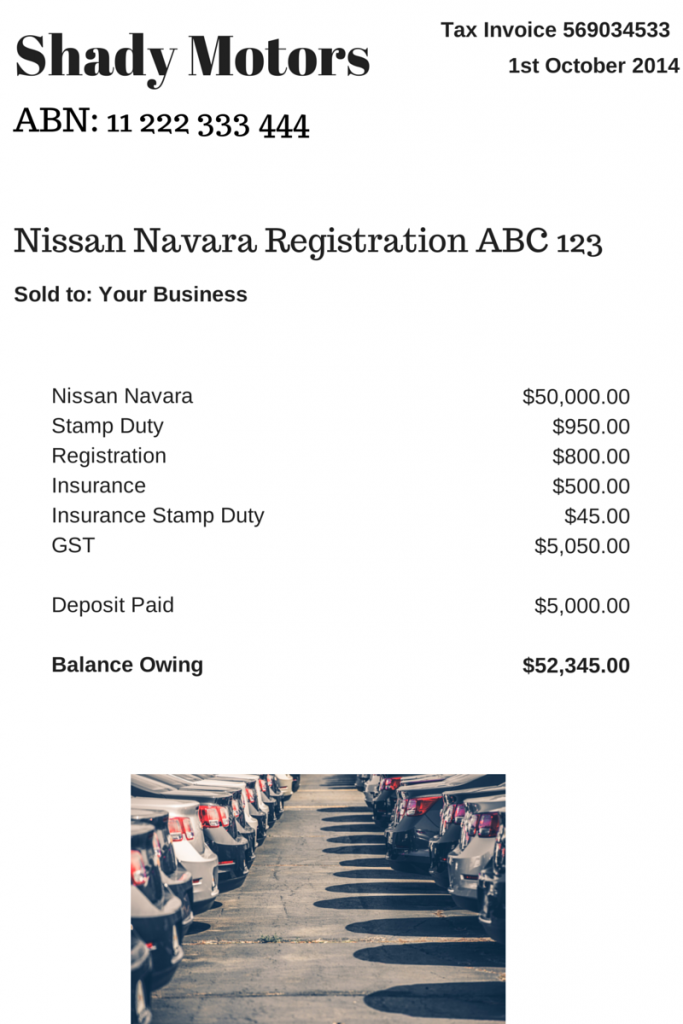
Let’s say your business has purchased a new motor vehicle. The invoice from the vehicle dealer might look something like this:
The Finance Company schedule could look like this:
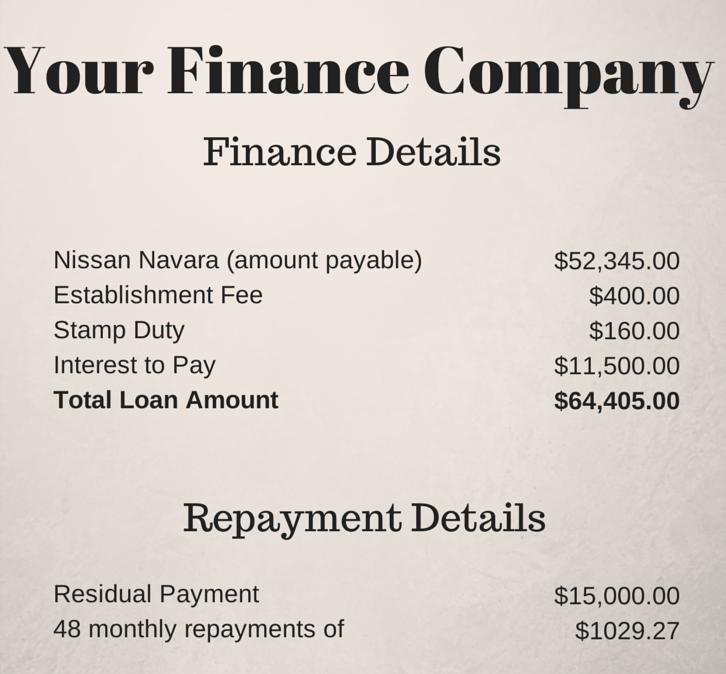
#Bookkeeping tip: if you want to accurately work out the repayments required by a finance company including the premium and the interest component, go to this amortisation calculator. I’ve been using it for years and I swear by it!
Okay so now you have to set up some accounts. Set up the following accounts (if not already created):
- Deposit Paid (Current Asset) – no tax code
- Motor Vehicles at Cost (Non-Current Asset) – apply capital expense including GST tax code
- Chattel Mortgage (Motor Vehicle) (Non-Current Liability) – no tax code
- Chattel Mortgage Interest Charges (Expense) – no tax code
- Chattel Mortgage Fees & Charges – tax code varies, could be be Free or GST inclusive
- Motor Vehicle Registration (Expense) – apply GST Free tax code
- Motor Vehicle Insurance (Expense) – apply GST inclusive tax code
- Unexpired Term Interest (Non-Current Liability) – no tax code
Now comes the bookkeeping part!
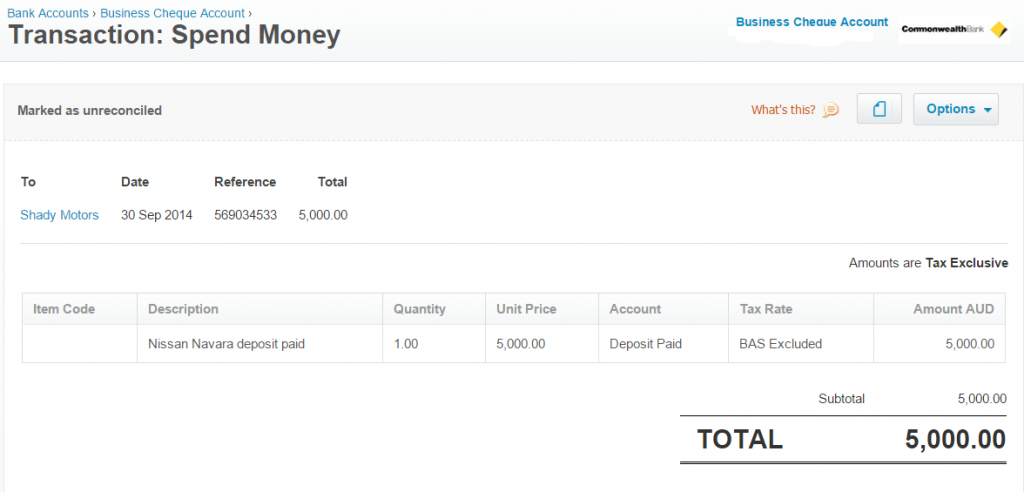
First enter a spend money transaction to record the payment of the deposit:
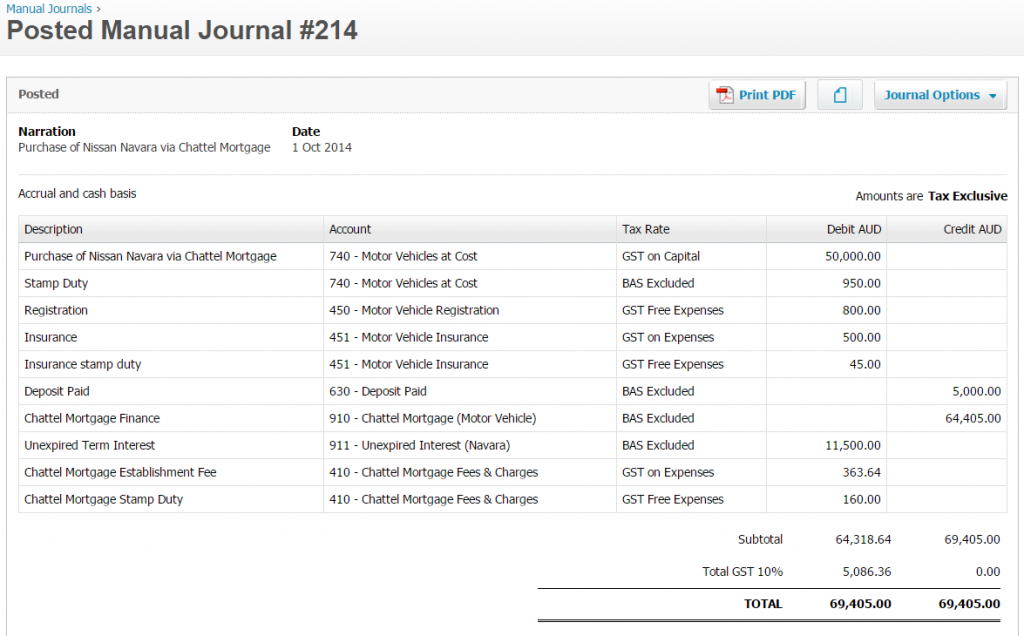
Next, enter this journal to record the purchase of the new vehicle:
When it comes time to make a repayment to the finance company, enter a spend money transaction like this:
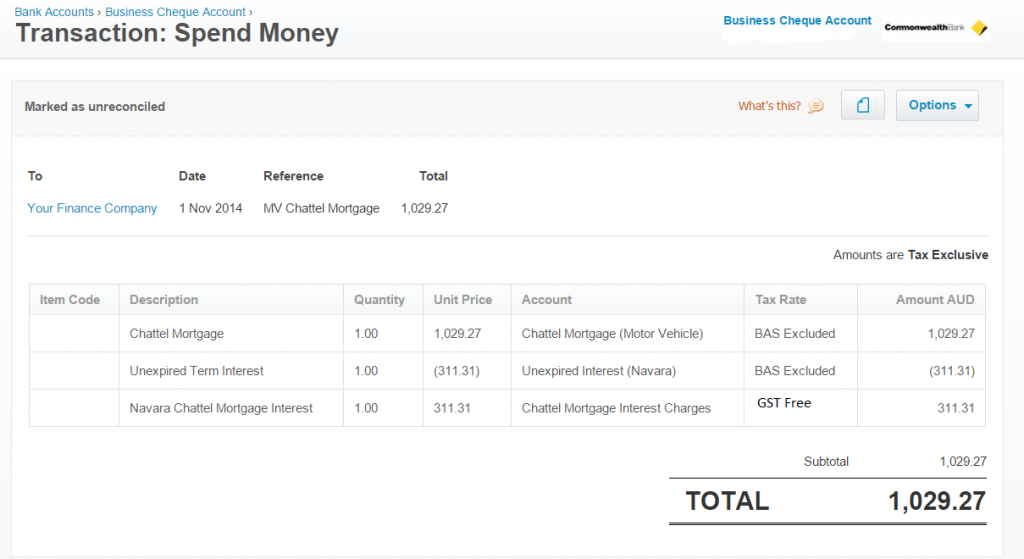
That’s all there is to it! I have used Xero for the examples above but the bookkeeping process applies in general to any software package so don’t be put off by the images. Next week I’ll review asset purchases via a Hire Purchase finance agreement. Until then, happy bookkeeping!

This was extremely helpful – I am using Xero and grappling with both accounting for the vehicle purchased via Chattel as well as the FBT component. I have posted on Xero Community and FlyingSolo without any replies yet.
Many thanks Louise!
Thanks Chris. Might be something your accountant could help with??
Why is the chattel mortgage interest – third line – coded as BAS excluded. Shouldn’t it be GST Free Expense?
MMMMM! Good pick up Michelle. Yes, I agree it should be GST Free! Looks like I’m going back to the drawing board! Thanks for letting me know.
Hi Michelle, just letting you know that my little error re the GST free expense has now been corrected. Thanks again for letting me know 🙂
Thanks Mark. Unfortunately I cannot give advice on individual accounting issues if I do not have a complete understanding of the financials and the background information behind them. You should direct your question to your accountant.
Hi Louise
Can you pls explain the computation behind $311.31 in the unexpired interest/finance cost- I cannot understand how you have arrived at that number.
Thanks
Dean
Hi Dean, there isn’t any real computation behind the $311.31 figure. I used this figure purely as an example of what the loan repayment may look like in terms of the transaction. Hope that helps.
Thanks Louise !
Hello Louise,
I don’t know what bookkeeping school have told you to record this Chattel this way !!! I have no Idea which accountant created your ‘911 ‘ account (unpaid interest liability ) . This amount is never recorded initially. Please read more about liability recognition definition ‘accounting standards’ (accounting 101) .
Let me express how it should look the Initial bookkeeping record:
Stamp duty (capital Motor Veh ) 950
Rego (expense ) 800
Insurance ( expense ) 500
Insurance stamp duty (expense) 45
Motor Vehicle ( cap asset ) 50 000
GST receivable 5050
Bank 5000
Chattel Mortgage 52345
Next record when 1st payment is made at 7% assumed interest (generally see the financial contract for the rate )
Interest expense 301.16 *
Chattel Mortgage liability 728.10
Bank 1029.27
* $52345 x 7% x 30/ 365 This is the way all the other Interests amounts is calculated based on monthly balance ( Chattel Mortgage payable )
Hope this will assist you more.
Regards
Kevin
Well thanks Kevin. I appreciate a different view point and that’s why I’m approving your comment, but not the aggressiveness of the delivery! For all you know I could be having a hard time of it right now (which I am) and waking up to this sort of comment doesn’t help. “Accounting 101”? How about “Manners 101” buddy? Be careful how your writing comes across – it is possible to make yourself heard without being rude.
Hi Louise
Stumbled across this post and found it really helpful. Do you ever include the payments and interest in Current Liabilities for the 12 month period?
Cheers
Hi Mary, do you mean in a prepayment type scenario? If so, yes, you could set this up where the payable invoice is coded to a liability account and subsequent monthly payments are then made to the same account to reduce the liability. Is that what you mean?
Hi Louise
I have been doing exactly your way of recording an asset purchase for 25 years. One of a few different methods. My accountants taught me to use the Liability account to record the interest and expense it as I go. Spot on my point of view. Depends on the type of mortgage etc of course.
Unpaid Interest is a liability. Nothing wrong with the classification of account. you don’t have to calculate the interest using first principles. You can get this from the loan repayment schedule which is 311.31 as Louise used.
Hi there
This was such a well presented wokflow and helped me greatly when purchasing my company vehicle.
I’m wondering if its possible to provide some guidance now that I’m ready to sell / dispose of the vehicle.
In the scenario where I’ve paid the loan out early, is it necessary to zero-out / clear the residual “unexpired term interest” amount from the non-current liability account?
Thanks Michael. Unfortunately I don’t give out accounting advice via my website posts. You will need to seek advice from your accountant.
Thanks for an awesome explanation, I was wondering how to enter this exact scenario because although the interest is added to the loan up front, it needed to be posted monthly. You have solved my problem with the unexpired term interest a/c. Thanks again!!
Thanks Bernice. You are welcome and glad I helped!
Thanks Louise, this was really well explained 🙂 Loved the simplified way of the explanation.
Hi Louise,
Thank you for such an easy to follow explanation. Just one question though, I didn’t think financial supply items attracted GST and therefore I would have thought that the establishment fee would be gst free? Many thanks.
Thanks, Jo. It depends on the finance company. You would need to refer to your documentation to see if they charged GST or not.
Hi Louise,
It’s good of you to give your time so freely. Just a quick question, how would you handle the “final payout (balloon) rather than an upfront deposit”
Thanks,
Phill
Hi Phill,
It would depend on what happens at the end of the schedule. Some people choose to refinance the balloon payment into a new loan and some choose to sell the asset and close the balloon payment along with the sale. In terms of the bookkeeping for the payment, it would just be a matter of applying the payment to the mortgage liability. The final payment should bring the loan figure to zero on the balance sheet.
Hello Louise,
How would the entry be different if vehicle was cost was over the luxury car tax limit? Everything as above and we manually reduce GST we claim?
I am trying to know from MYOB point of view.
Thank you
Ash
Hi Ash,
So, yes, you need to reduce the GST to the current maximum GST credit you can claim which is $5,885 in the 2022-23 FY. You do this by having two lines for the vehicle cost – one for $67,735 inc $5885 GST and one for the balance with no GST. Everything else would be the same.
Hi Louise,
Thank you so much for the clear explanation of this process and it has helped me a lot using Quickbooks Online.
Just a further question regarding your answer above to the poster’s query regarding the luxury car GST limit. I have followed your advice regarding having two lines for the vehicle cost being one for $69,674 inc $6,334 GST (2024-25) and one for the balance of the purchase price with no GST. However, whilst the journal total debit and credit amounts match with the total financed cost, this causes the Motor Vehicle at cost value on the Balance Sheet to be overstated by 1/11 of the amount of the GST that would have applied to the balance portion of the purchase price.
Example
Invoice:
Vehicle amount subject to GST – 69,669.77
GST 6,966.98
Stamp Duty 3,200.40
= Motor Vehicle at cost $72,870.17
Journal:
1, Motor Vehicle at cost 69,674.00 – GST on Purchase (6,334.00)
2. Motor Vehicle at cost 6,962.75 – Out of Scope
3.Motor Vehicle at cost S/D 3,200.40 – Out of Scope
=Motor Vehicle at cost on Balance Sheet $73,503.15
Hopefully the above makes sense and would appreciate any feedback where I’m going wrong or suggestions regarding a work around.
Hi Rob, I would need to sight the source docs to be sure, but I think the total figure for the MV cost should be $79,837.14. In your example of the invoice, you didn’t include the GST of $6,966.98 and so ended up with a figure of $72,870.17. In your journal, the end result should also be $79,837.14 i.e. MV inc GST $69,674.00 plus stamp duty $3,200.40, plus MV outside limit $6,962.74. Does this help? Like I said, without sighting the source docs,it’s a bit hard for me to be sure regarding the figures.
Hi Louise, thanks for the reply and agree with your figures but I am still having problems with the amount on the Balance Sheet for the MV at Cost (excludes GST) after entering the Journal. Like you said it’s difficult to see where I’m going wrong without the source docs. I’ll sit down with my Accountant and hopefully sort it out. Appreciate you help.
Hi Rob, just a thought, are you entering the journal inclusive of GST or exclusive? Some software allows you to choose one or the other. This could be the issue – I know because it happens to me a lot!
Hey Lousie,
This is a nice article and nice to see it still relevant nearly 10 years later!
I have a query with TFE (temporary full expensing) that has been available over the last 3 years and due to expire soon – https://www.ato.gov.au/Business/Depreciation-and-capital-expenses-and-allowances/Temporary-full-expensing/
How do we account for the full expense of the vehicle rather than the monthly depreciation amounts?
Hi Dean,
Thanks for your comments. Re your question, I am unable to answer specific tax questions. You will need to ask your accountant about this one.
Hi Louise,
Thank you so much for this, very well presented.
One question, what is the purpose of both an Unexpired Term Interest (311.31) and a Chattel Mortgage Interest 311.31 entry / account? Wouldn’t both of these cancel each other out and not show the accumulated interest as well as the increasing principal payment over time until the loan is paid off?
Thank you 😎
Hi Anna. Thanks for your question. The unexpired term interest is reduced each month on the balance sheet, but the interest expense entry is to show the interest on the P&L as it is a deductible expense. I hope that helps.
Hi Louise,
Thank you for the clarification. Presumably the Unexpired Term Interest and Chattel Mortgage Interest are two separate accounts (Unexpired Term Interest a Liability and the Chattel Mortgage Interest an Expense)?
Thanks again
Anna
Hi Anna, yes you are correct. Unexpired interest is a liability and the other interest account is an expense account.
Hi Louise – Thank you for your excellent example.
Just wondering, instead of 410, could you put the establishment fee to 708 borrowing costs and write it off over 5 years (DR borrowing cost expense CR 709 less written off amount)? Could gst be included against 708?